

Hello commanders,
Over the last few days we have received several questions along the lines of "the phalanx showed no movement at all, but the fleet disappeared". This guide explains how the Sensor Phalanx works from start to finish, so you can use it as a reference.

First, one important point: OGameXL follows the original OGame rules one to one for the vast majority of its game mechanics. Server speeds are different, but buildings, fleet missions, espionage, combat and the Sensor Phalanx all work the way they do in the original game. Everything described below works exactly the same in original OGame. If you ever find something that behaves differently from the original, let us know. We check it, and if you are right we fix it and name it in the patch notes.
1. The basics
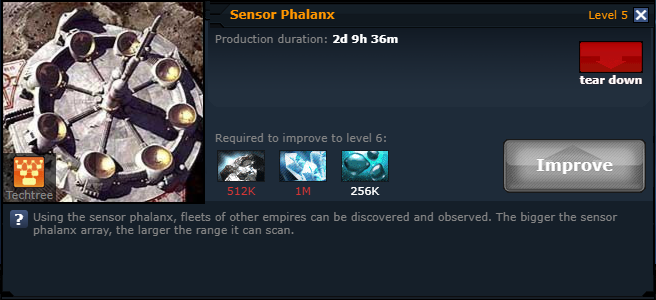
• The Sensor Phalanx can only be built on a moon.
• Every scan costs 5,000 Deuterium, taken from the moon you scan from.
• Only planets can be scanned. Moons cannot be scanned.
• The target must be in the same galaxy and within your phalanx range. The range grows as the phalanx level goes up.
• The scanned player receives no notification about the scan.
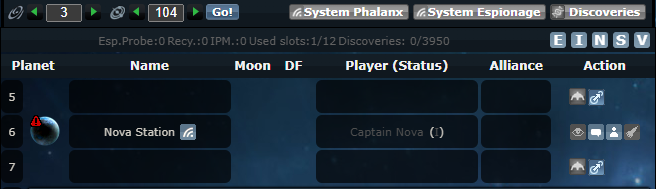
To scan, switch to your moon, open the Galaxy view and click the phalanx icon next to the planet name. The icon only appears on other players' planets within your range.
Range and scan bonuses
• Discoverer class: +20% phalanx range.
• Researchers alliance class: can scan an entire system at once instead of a single planet (moons in the system are still excluded).
2. The phalanx is not a live view
This is the most common misunderstanding.
A scan is a snapshot of the exact second you pressed the button. It is not a live camera.
• Keeping the phalanx window open does NOT update it. The window never refreshes by itself. The only thing that moves are the countdown timers of the fleets that were already in the list when you scanned.
• A fleet launched after your scan will NOT appear in that window, no matter how long you keep watching it.
• To see anything new you have to scan again. The refresh button in the window does a new scan and costs another 5,000 Deuterium.
• Even scanning again and again will not reveal the flights listed under "What you will NOT see" below.
So "I kept the phalanx open the whole time and saw nothing" does not mean nothing happened.
3. What you WILL see when scanning a planet
✔ Fleets flying to that planet: attack, ACS attack, transport, espionage, ACS defend, deployment coming from another planet, and so on.
✔ The return flight of fleets that left that planet and will come back to it: attack, transport, espionage, expedition, recycling, and so on.
✔ Recalled missions that have a return trip: for example the return of a recalled attack to the planet.
Here is what a real scan looks like:
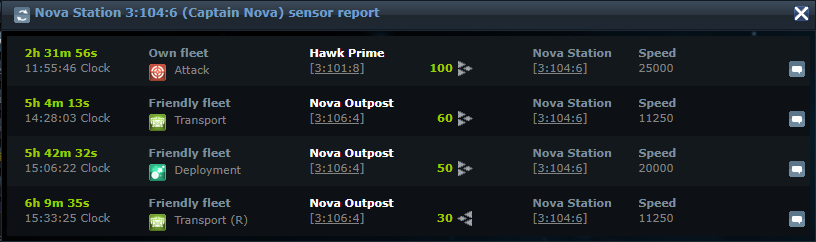
The first three rows are fleets flying to the scanned planet: an attack, a transport and a deployment. The last row, marked (R), is a fleet that left this planet earlier and is now returning to it. When that fleet left, the phalanx showed nothing. It only becomes visible on its way back.
An important detail: the phalanx does not show the departure itself. For a mission with a return trip you see its return to the planet, not the outbound flight.
4. What you will NOT see
✖ A deployment leaving the scanned planet. Deployment is a one way mission with no return, so its departure never appears.
✖ Any flight going to a moon. Moons cannot be scanned, so the arrival is not shown anywhere. It does not matter which system the moon is in.
✖ A recalled deployment. It disappears from the phalanx the moment it is recalled.
✖ A flight to a debris field. Only the return to the planet is shown.
✖ Flights departing from a moon. The departure from a moon is never shown. If the target is a planet, the arrival is only visible when that target planet is scanned.
✖ Jump Gate transfers. A jump is not a flight and never appears on the phalanx.
5. Quick reference
Assuming planet X is being scanned:
• Attack / transport / espionage from elsewhere to X: ✔ VISIBLE
• Deployment from another planet to X: ✔ VISIBLE
• Attack / transport / espionage / expedition leaving X: outbound ✖ NOT VISIBLE, return ✔ VISIBLE
• Attack from X that gets recalled: ✔ VISIBLE (the return)
• Deployment from X to another planet: ✖ NOT VISIBLE (the arrival is visible if the target planet is scanned)
• Deployment from X to any moon: ✖ NOT VISIBLE ANYWHERE
• Recalled deployment: ✖ NOT VISIBLE
• Recycling from X to a debris field: outbound ✖ NOT VISIBLE, return ✔ VISIBLE
• Any flight from a moon to a moon: ✖ NOT VISIBLE ANYWHERE
• Jump Gate: ✖ NOT VISIBLE
6. Example scenario
This is the general shape of the situation behind the recent questions:
7. Tips for attackers
• No movement on the phalanx does not mean the fleet is still there.
• The defender sees your attack from the moment you launch it. The longer your flight time, the more time they have to react.
• The most reliable check is an espionage report right before your fleet arrives. If the planet is empty, you can still recall your attack.
• Use the phalanx to catch the return time of your target's fleet. Returns of missions with a return trip are visible.
• Check your target's moons in the galaxy view. If they have a moon in another system, they can move their fleet there unseen.
8. Tips for defenders

• A fleet parked on a planet can be seen with espionage, and the return time of a save made with a return mission can be caught with a phalanx.
• A moon is the safest place to keep and save your fleet. Moons cannot be scanned.
• If you save from a planet, a deployment to a moon does not show on the phalanx.
• A save from one moon to another moon is completely invisible, both at departure and at arrival.
• If you are going offline for a long time, do not leave your fleet unprotected.
Feel free to post your questions below. If you run into a situation that you believe works differently from original OGame, open a support ticket and send us the time and coordinates. We check every report against the records, one by one.
Good hunting, and fly safe!
The OGameXL Game Knowledge Team
Over the last few days we have received several questions along the lines of "the phalanx showed no movement at all, but the fleet disappeared". This guide explains how the Sensor Phalanx works from start to finish, so you can use it as a reference.
First, one important point: OGameXL follows the original OGame rules one to one for the vast majority of its game mechanics. Server speeds are different, but buildings, fleet missions, espionage, combat and the Sensor Phalanx all work the way they do in the original game. Everything described below works exactly the same in original OGame. If you ever find something that behaves differently from the original, let us know. We check it, and if you are right we fix it and name it in the patch notes.
1. The basics
• The Sensor Phalanx can only be built on a moon.
• Every scan costs 5,000 Deuterium, taken from the moon you scan from.
• Only planets can be scanned. Moons cannot be scanned.
• The target must be in the same galaxy and within your phalanx range. The range grows as the phalanx level goes up.
• The scanned player receives no notification about the scan.
To scan, switch to your moon, open the Galaxy view and click the phalanx icon next to the planet name. The icon only appears on other players' planets within your range.
Range and scan bonuses
• Discoverer class: +20% phalanx range.
• Researchers alliance class: can scan an entire system at once instead of a single planet (moons in the system are still excluded).
2. The phalanx is not a live view
This is the most common misunderstanding.
A scan is a snapshot of the exact second you pressed the button. It is not a live camera.
• Keeping the phalanx window open does NOT update it. The window never refreshes by itself. The only thing that moves are the countdown timers of the fleets that were already in the list when you scanned.
• A fleet launched after your scan will NOT appear in that window, no matter how long you keep watching it.
• To see anything new you have to scan again. The refresh button in the window does a new scan and costs another 5,000 Deuterium.
• Even scanning again and again will not reveal the flights listed under "What you will NOT see" below.
So "I kept the phalanx open the whole time and saw nothing" does not mean nothing happened.
3. What you WILL see when scanning a planet
✔ Fleets flying to that planet: attack, ACS attack, transport, espionage, ACS defend, deployment coming from another planet, and so on.
✔ The return flight of fleets that left that planet and will come back to it: attack, transport, espionage, expedition, recycling, and so on.
✔ Recalled missions that have a return trip: for example the return of a recalled attack to the planet.
Here is what a real scan looks like:
The first three rows are fleets flying to the scanned planet: an attack, a transport and a deployment. The last row, marked (R), is a fleet that left this planet earlier and is now returning to it. When that fleet left, the phalanx showed nothing. It only becomes visible on its way back.
An important detail: the phalanx does not show the departure itself. For a mission with a return trip you see its return to the planet, not the outbound flight.
4. What you will NOT see
✖ A deployment leaving the scanned planet. Deployment is a one way mission with no return, so its departure never appears.
✖ Any flight going to a moon. Moons cannot be scanned, so the arrival is not shown anywhere. It does not matter which system the moon is in.
✖ A recalled deployment. It disappears from the phalanx the moment it is recalled.
✖ A flight to a debris field. Only the return to the planet is shown.
✖ Flights departing from a moon. The departure from a moon is never shown. If the target is a planet, the arrival is only visible when that target planet is scanned.
✖ Jump Gate transfers. A jump is not a flight and never appears on the phalanx.
5. Quick reference
Assuming planet X is being scanned:
• Attack / transport / espionage from elsewhere to X: ✔ VISIBLE
• Deployment from another planet to X: ✔ VISIBLE
• Attack / transport / espionage / expedition leaving X: outbound ✖ NOT VISIBLE, return ✔ VISIBLE
• Attack from X that gets recalled: ✔ VISIBLE (the return)
• Deployment from X to another planet: ✖ NOT VISIBLE (the arrival is visible if the target planet is scanned)
• Deployment from X to any moon: ✖ NOT VISIBLE ANYWHERE
• Recalled deployment: ✖ NOT VISIBLE
• Recycling from X to a debris field: outbound ✖ NOT VISIBLE, return ✔ VISIBLE
• Any flight from a moon to a moon: ✖ NOT VISIBLE ANYWHERE
• Jump Gate: ✖ NOT VISIBLE
6. Example scenario
This is the general shape of the situation behind the recent questions:
- The attacker spies a target whose fleet is sitting on a planet and sees the fleet.
- The attacker launches. The defender sees that attack in their event list from the moment it is launched.
- During the flight the attacker scans the target with the phalanx. No movement.
- A few seconds before the attack lands, the defender sends the fleet from the planet as a deployment to one of their own moons in another system.
- That flight does not appear in any scan: the departure from a planet is not shown, and the target is a moon.
- The attack lands on an empty planet.
7. Tips for attackers
• No movement on the phalanx does not mean the fleet is still there.
• The defender sees your attack from the moment you launch it. The longer your flight time, the more time they have to react.
• The most reliable check is an espionage report right before your fleet arrives. If the planet is empty, you can still recall your attack.
• Use the phalanx to catch the return time of your target's fleet. Returns of missions with a return trip are visible.
• Check your target's moons in the galaxy view. If they have a moon in another system, they can move their fleet there unseen.
8. Tips for defenders
• A fleet parked on a planet can be seen with espionage, and the return time of a save made with a return mission can be caught with a phalanx.
• A moon is the safest place to keep and save your fleet. Moons cannot be scanned.
• If you save from a planet, a deployment to a moon does not show on the phalanx.
• A save from one moon to another moon is completely invisible, both at departure and at arrival.
• If you are going offline for a long time, do not leave your fleet unprotected.
Feel free to post your questions below. If you run into a situation that you believe works differently from original OGame, open a support ticket and send us the time and coordinates. We check every report against the records, one by one.
Good hunting, and fly safe!
The OGameXL Game Knowledge Team
Hello commanders,
Over the last few days we have received several questions along the lines of [i]"the phalanx showed no movement at all, but the fleet disappeared"[/i]. This guide explains how the Sensor Phalanx works from start to finish, so you can use it as a reference.
[img]https://ogamexl.com/img/guides/sensor-phalanx/moon-base-phalanx.jpg[/img]
First, one important point: [b]OGameXL follows the original [url=https://ogamexl.com/]OGame[/url] rules one to one for the vast majority of its game mechanics.[/b] Server speeds are different, but buildings, fleet missions, espionage, combat and the Sensor Phalanx all work the way they do in the original game. Everything described below works exactly the same in original OGame. If you ever find something that behaves differently from the original, let us know. We check it, and if you are right we fix it and name it in the patch notes.
[b][color=#6f9fc8]1. The basics[/color][/b]
• The Sensor Phalanx can only be built on a [b]moon[/b].
• Every scan costs [b][color=#5fb3d9]5,000 Deuterium[/color][/b], taken from the moon you scan from.
• Only [b]planets[/b] can be scanned. [b][color=#e05a4f]Moons cannot be scanned.[/color][/b]
• The target must be in the same galaxy and within your phalanx range. The range grows as the phalanx level goes up.
• The scanned player receives [u]no notification[/u] about the scan.
[img]https://ogamexl.com/img/guides/sensor-phalanx/01-phalanx-building.png[/img]
To scan, switch to your moon, open the [b]Galaxy[/b] view and click the [b][color=#5fb3d9]phalanx icon[/color][/b] next to the planet name. The icon only appears on other players' planets within your range.
[img]https://ogamexl.com/img/guides/sensor-phalanx/02-galaxy-phalanx-icon.png[/img]
[b]Range and scan bonuses[/b]
• [b][color=#d9b44a]Discoverer[/color][/b] class: [b]+20%[/b] phalanx range.
• [b][color=#d9b44a]Researchers[/color][/b] alliance class: can scan an [b]entire system[/b] at once instead of a single planet (moons in the system are still excluded).
[b][color=#6f9fc8]2. The phalanx is not a live view[/color][/b]
This is the most common misunderstanding.
A scan is a [b][color=#d9b44a]snapshot of the exact second you pressed the button[/color][/b]. It is not a live camera.
• Keeping the phalanx window open does [b]NOT[/b] update it. The window never refreshes by itself. The only thing that moves are the countdown timers of the fleets that were already in the list when you scanned.
• A fleet launched after your scan will [b]NOT[/b] appear in that window, no matter how long you keep watching it.
• To see anything new you have to scan again. The refresh button in the window does a new scan and costs another 5,000 Deuterium.
• Even scanning again and again will not reveal the flights listed under [i]"What you will NOT see"[/i] below.
So [i]"I kept the phalanx open the whole time and saw nothing"[/i] does not mean nothing happened.
[b][color=#6f9fc8]3. What you [/color][color=#6fbf73]WILL[/color][color=#6f9fc8] see when scanning a planet[/color][/b]
[b][color=#6fbf73]✔[/color][/b] [b]Fleets flying to that planet:[/b] attack, ACS attack, transport, espionage, ACS defend, deployment coming from another planet, and so on.
[b][color=#6fbf73]✔[/color][/b] [b]The return flight of fleets that left that planet and will come back to it:[/b] attack, transport, espionage, expedition, recycling, and so on.
[b][color=#6fbf73]✔[/color][/b] [b]Recalled missions that have a return trip:[/b] for example the return of a recalled attack to the planet.
Here is what a real scan looks like:
[img]https://ogamexl.com/img/guides/sensor-phalanx/03-scan-result.png[/img]
The first three rows are fleets [b][color=#6fbf73]flying to[/color][/b] the scanned planet: an attack, a transport and a deployment. The last row, marked [b](R)[/b], is a fleet that left this planet earlier and is now [b][color=#6fbf73]returning[/color][/b] to it. When that fleet left, the phalanx showed nothing. It only becomes visible on its way back.
An important detail: the phalanx [b][u]does not show the departure itself[/u][/b]. For a mission with a return trip you see its return to the planet, not the outbound flight.
[b][color=#6f9fc8]4. What you will [/color][color=#e05a4f]NOT[/color][color=#6f9fc8] see[/color][/b]
[b][color=#e05a4f]✖[/color][/b] [b]A deployment leaving the scanned planet.[/b] Deployment is a one way mission with no return, so its departure never appears.
[b][color=#e05a4f]✖[/color][/b] [b]Any flight going to a moon.[/b] Moons cannot be scanned, so the arrival is not shown anywhere. It does not matter which system the moon is in.
[b][color=#e05a4f]✖[/color][/b] [b]A recalled deployment.[/b] It disappears from the phalanx the moment it is recalled.
[b][color=#e05a4f]✖[/color][/b] [b]A flight to a debris field.[/b] Only the return to the planet is shown.
[b][color=#e05a4f]✖[/color][/b] [b]Flights departing from a moon.[/b] The departure from a moon is never shown. If the target is a planet, the arrival is only visible when that target planet is scanned.
[b][color=#e05a4f]✖[/color][/b] [b]Jump Gate transfers.[/b] A jump is not a flight and never appears on the phalanx.
[b][color=#6f9fc8]5. Quick reference[/color][/b]
Assuming [b]planet X[/b] is being scanned:
• Attack / transport / espionage from elsewhere to X: [b][color=#6fbf73]✔ VISIBLE[/color][/b]
• Deployment from another planet to X: [b][color=#6fbf73]✔ VISIBLE[/color][/b]
• Attack / transport / espionage / expedition leaving X: outbound [b][color=#e05a4f]✖ NOT VISIBLE[/color][/b], return [b][color=#6fbf73]✔ VISIBLE[/color][/b]
• Attack from X that gets recalled: [b][color=#6fbf73]✔ VISIBLE[/color][/b] (the return)
• Deployment from X to another planet: [b][color=#e05a4f]✖ NOT VISIBLE[/color][/b] (the arrival is visible if the target planet is scanned)
• Deployment from X to any moon: [b][color=#e05a4f]✖ NOT VISIBLE ANYWHERE[/color][/b]
• Recalled deployment: [b][color=#e05a4f]✖ NOT VISIBLE[/color][/b]
• Recycling from X to a debris field: outbound [b][color=#e05a4f]✖ NOT VISIBLE[/color][/b], return [b][color=#6fbf73]✔ VISIBLE[/color][/b]
• Any flight from a moon to a moon: [b][color=#e05a4f]✖ NOT VISIBLE ANYWHERE[/color][/b]
• Jump Gate: [b][color=#e05a4f]✖ NOT VISIBLE[/color][/b]
[b][color=#6f9fc8]6. Example scenario[/color][/b]
This is the general shape of the situation behind the recent questions:
[list=1]
[*]The attacker spies a target whose fleet is sitting on a planet and sees the fleet.
[*]The attacker launches. The defender sees that attack in their event list from the moment it is launched.
[*]During the flight the attacker scans the target with the phalanx. No movement.
[*]A few seconds before the attack lands, the defender sends the fleet from the planet as a [b][color=#d9b44a]deployment to one of their own moons in another system[/color][/b].
[*]That flight does not appear in any scan: the departure from a planet is not shown, and the target is a moon.
[*]The attack lands on an empty planet.
[/list]
Nothing is broken here. This is one of the classic [b]fleetsave[/b] methods in OGame.
[b][color=#e0703a]7. Tips for attackers[/color][/b]
• No movement on the phalanx does [b]not[/b] mean the fleet is still there.
• The defender sees your attack from the moment you launch it. The longer your flight time, the more time they have to react.
• The most reliable check is an [b][color=#e0703a]espionage report right before your fleet arrives[/color][/b]. If the planet is empty, you can still recall your attack.
• Use the phalanx to catch the [b]return time[/b] of your target's fleet. Returns of missions with a return trip are visible.
• Check your target's moons in the galaxy view. If they have a moon in another system, they can move their fleet there unseen.
[b][color=#5fb3d9]8. Tips for defenders[/color][/b]
[img]https://ogamexl.com/img/planets/normal_moon_view.jpg[/img]
• A fleet parked on a planet can be seen with espionage, and the return time of a save made with a return mission can be caught with a phalanx.
• A [b][color=#5fb3d9]moon is the safest place to keep and save your fleet[/color][/b]. Moons cannot be scanned.
• If you save from a planet, a deployment to a moon does not show on the phalanx.
• A save from one moon to another moon is [b]completely invisible[/b], both at departure and at arrival.
• If you are going offline for a long time, do not leave your fleet unprotected.
Feel free to post your questions below. If you run into a situation that you believe works differently from original OGame, open a support ticket and send us the time and coordinates. We check every report against the records, one by one.
Good hunting, and fly safe!
[b][color=#6f9fc8]The OGameXL Game Knowledge Team[/color][/b]